Help
How TeachEdge Credits Are Calculated
Credits cover the AI processing used when TeachEdge marks work, gives feedback, supports tutoring, generates teaching resources or processes uploaded scripts.
Different tasks can use different amounts of credit because they do not all require the same amount of AI processing. A short typed GCSE answer, a generated set of questions, a long text-based A Level essay, a photographed script and a Exam Script Marking batch are very different types of work.
The simple rule
In TeachEdge, 5,000 tokens = 1 credit.
A token is a small unit used to measure text and AI processing. Longer answers, longer instructions, detailed mark schemes and more complex inputs usually require more tokens.
You do not need to count tokens yourself. TeachEdge shows the credits used each time a tool is used or an essay is marked, and you can always see your remaining credit balance.
Maximum marking charges
The default maximum credit charge for marking each response is:
- 1 credit when both the question and response are text-only.
- 2.5 credits when either the question or response includes image-based material, including handwriting.
Actual usage may be lower. These caps limit the credit charge, not the amount of feedback provided. Any agreed licence-specific arrangements take precedence.
These caps apply to marking responses. They do not set a maximum charge for other tools such as Question Generator or tutoring.
Why credits vary
Credit use can vary depending on:
- the length of the student answer;
- the amount of question, mark scheme or teacher guidance included;
- the size and detail of the output being generated;
- whether the work is typed text, an image, a scan or a PDF;
- whether TeachEdge needs to interpret or extract text from an uploaded script;
- the number and length of scripts in a Exam Script Marking batch;
- the type of TeachEdge tool being used.
Credit use varies by task. Shorter text responses may use less than 1 credit. Image-based marking may cost more than text-only marking, within the applicable maximum charge per response. For Exam Script Marking, the batch total reflects the charges for the individual responses; the cap is not a single maximum for the whole batch. Question Generator and other AI tools consume credits according to the processing required.
Examples of typical credit use
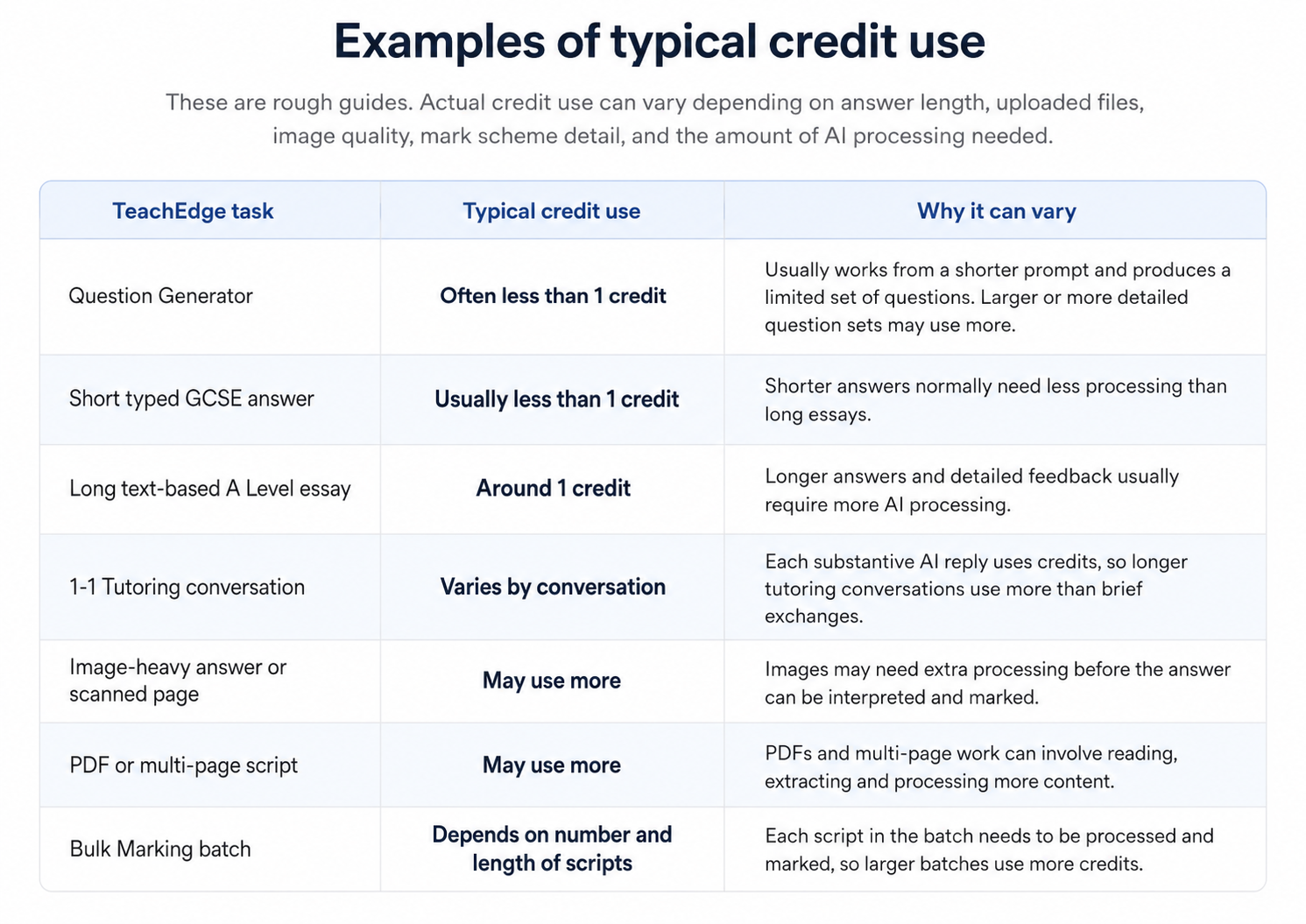
These examples are rough guides. Actual credit use varies by task and processing requirements. Marking charges remain subject to the applicable maximum per response. A scanned batch can cost more than 2.5 credits in total because it contains multiple responses.
Why we use this approach
We use a token-based credit system because it is fairer across different usage patterns.
Different tasks require different amounts of AI processing. Credit charges reflect that usage, with the applicable maximum charge limiting the cost of each marked response.
It is more detailed than a simple “one task = one credit” rule, so TeachEdge makes credit use visible after each task.
Checking usage
TeachEdge shows the credits used each time a tool is used or an essay is marked. You can also see your remaining credit balance in TeachEdge.
App Leads can use Credit Usage Overview to review school-level and department-level summaries. This is designed to support planning, budgeting and transparency.
Credit Usage Overview uses summary data. It does not show student answers, prompts, generated feedback, uploaded files, chat messages, raw usage records or teacher-by-teacher breakdowns.